
Make Your Salesforce CRM Work With Your Team — Not Against Them
Confirmed keeps Salesforce accurate without stealing time from selling. Salespeople stay focused on meetings and follow-ups. Leaders get reliable data they can trust.
CRM Shouldn’t Force a Tradeoff
You shouldn’t have to choose between salespeople doing their best work and leadership having accurate, up-to-date CRM data.
Yet most CRM implementations create exactly that tension. Confirmed removes it.
- Salespeople stay focused on meetings and follow-ups — not admin.
- Salesforce stays current without constant reminders and policing.
- Executives get visibility they can trust for forecasts and decisions.
The Problem Isn’t Salesforce — It’s When Updates Happen
Most CRM tools assume the work starts at logging. In reality, the work starts earlier: when someone is met, when context needs to be remembered, and when follow-up determines whether momentum continues. By the time logging becomes “the task,” the energy is already gone.
Confirmed fixes CRM by fitting into the way work actually happens.
How Real Relationships Move Forward
Most tools help with one step in the middle. Confirmed supports the entire flow — so Salesforce reflects reality instead of leftovers. That’s why CRM data stays current without forcing people to stop selling to update records.
Log What Matters — All at Once
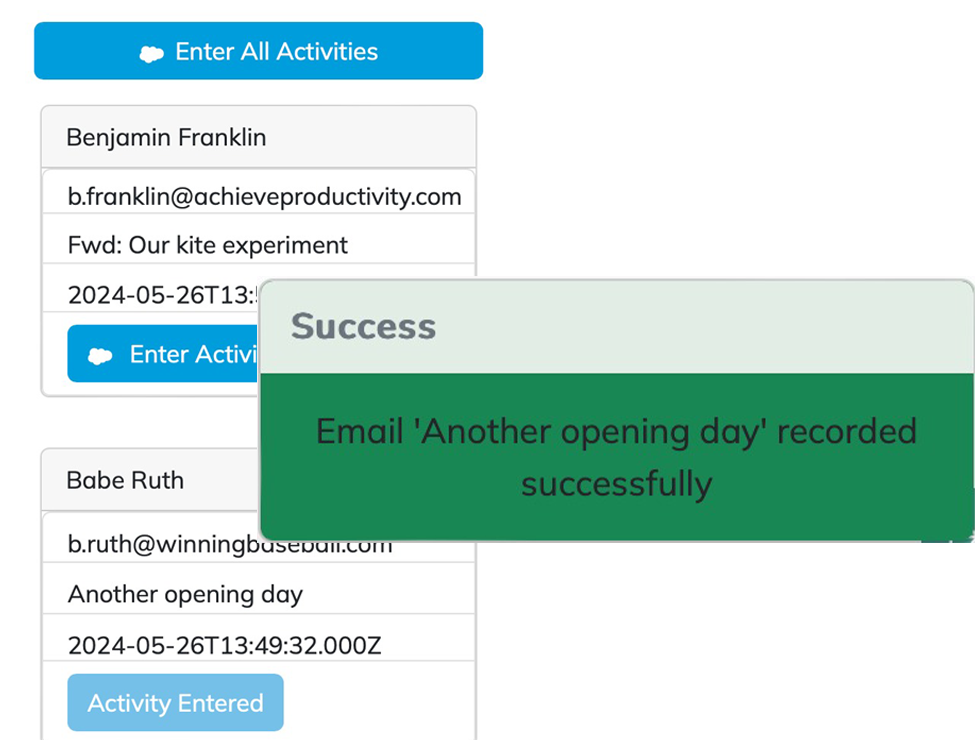
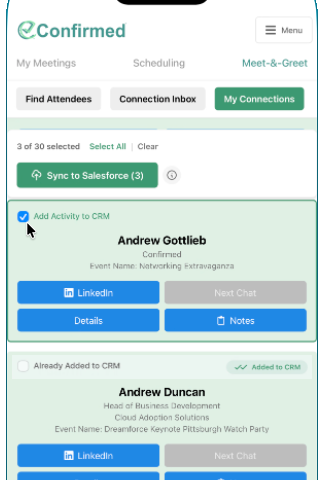
After meetings, events, or follow-ups, salespeople don’t want to log records one by one — and they shouldn’t have to. Confirmed lets users select the interactions that matter, add context once, and log them together.
What this changes
- Fewer interruptions
- Less repetition
- More complete CRM records
Time saved
What used to take hours gets done in minutes. Teams that use this workflow consistently often reclaim several hours per person each week — in some cases, nearly a full workday — simply by eliminating repetitive, after-the-fact CRM entry.
Built for Real Sales Work — Not After-the-Fact Admin
Confirmed works right inside Microsoft Outlook and during the real encounters that actually drive revenue — including face-to-face meetings, emails, and follow-ups. Context is captured while conversations are still fresh, then synced to Salesforce in minutes instead of being lost to inbox overload or memory fade.
For salespeople
- Stay focused on meetings and follow-ups.
- Keep Salesforce updated without admin drag.
- Capture the right context while it’s still fresh.
For leaders
- Get reliable visibility into real revenue activity.
- Improve forecasts without burning rep time.
- Increase adoption without enforcement.
That’s why salespeople use Confirmed — and why leaders trust the data.
Perfect for Individuals — Proven at Team Scale
Confirmed is designed to work whether you’re an individual who wants your time back, or a team that needs reliable CRM data without burnout. Same workflow. Different scale.
Individuals
- Stay focused on selling — not manual CRM work.
- Keep Salesforce updated without disruption.
- Improve your productivity and visibility.
Teams
- CRM updates happen naturally and in batch inside Outlook, and immediately after conversations with prospects and clients.
- Adoption improves without policing.
- Decisions and coaching are based on real activity.
Get More Value From the Salesforce Investment You Already Made
Sales teams are expensive. Salesforce is a major investment. The value of both depends on how well real revenue activity is captured. Confirmed helps ensure sales conversations don’t disappear between meetings, inboxes, and manual updates — so leadership decisions are based on what’s actually happening.
All without adding headcount, admin time, or friction — and in a cost-effective way.
Built by People Who Understand Salesforce
Confirmed works out of the box for most teams. And if your Salesforce setup is more complex, our team understands the Salesforce stack well enough to help you get more productivity from it — without adding friction for your team.
For teams with more complex Salesforce environments, we’re happy to talk through how Confirmed fits into your existing setup.
Make CRM Work the Way Your Team Actually Works
Stop losing revenue signals between meetings, inboxes, and manual updates. Keep Salesforce accurate without slowing your team down.